8. 🚀support with AI
8.1. 🌟 Overview
Welcome to the next generation of user support within the TOAR Data Dashboard. We’ve transformed the traditional “contact us” experience into a seamless, intelligent, and efficient interaction flow. Integrated directly into the dashboard footer, our Smart Support Modal ensures that help is always just one click away—without ever disrupting your workflow.
8.2. 🛠️ How to Use It
The support workflow is designed for speed and clarity. It guides users through a logical progression: AI Assistance → Ticket Submission.
Access Support:
Look at the dashboard footer. Click the “Support” link to instantly open the modal overlay.
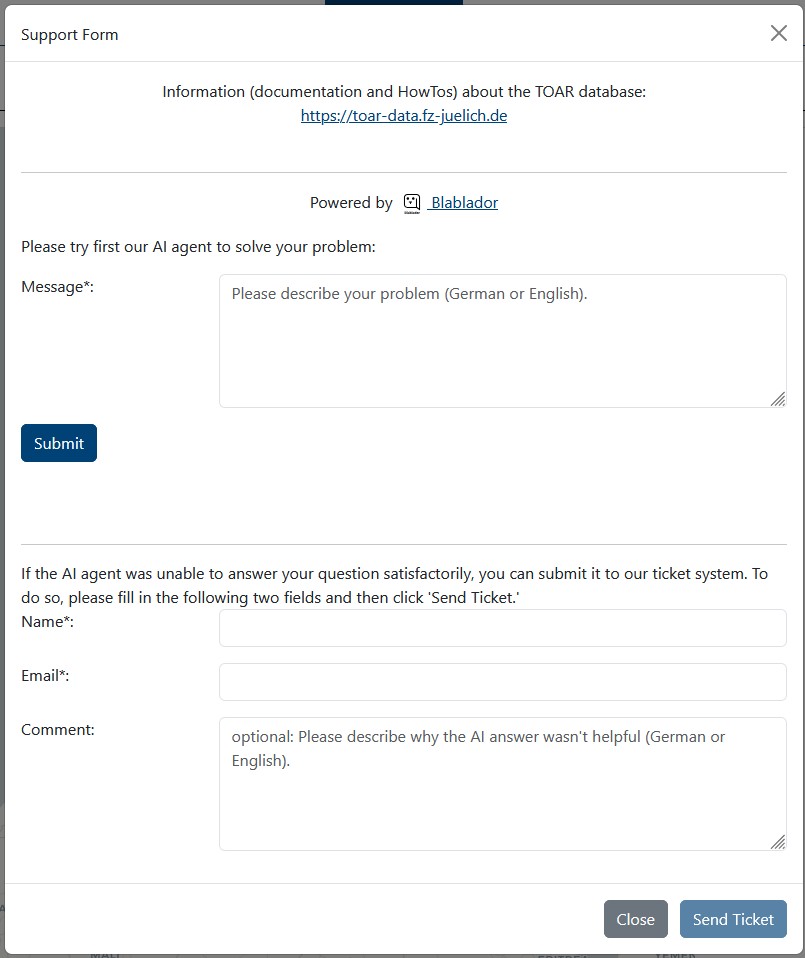
AI-Powered Inquiry (Step 1):
Enter your question in the Message field.
Click the “Submit” button.
The Blablador AI agent processes your request instantly.
The response appears in a rich text Markdown format, allowing for clear, formatted instructions.
Ticket Submission (Step 2):
If the AI solution doesn’t fully resolve your issue, simply fill in your Name and Email address.
Optionally, you can also fill the Comment field and explain, why the AI answer wasn’t helpful.
Click “Send Ticket”.
The system securely emails your query, the AI’s response, and your contact details to the support team.
Feedback Loop:
Success or error messages appear in real-time.
The modal resets automatically upon closing, ready for your next question.
8.3. 🏆 Built for Users, Loved by Administrators
“The best support is support that resolves the issue before it becomes a ticket.”
This isn’t just a contact form; it’s an automated support assistant wrapped in a beautiful interface. By this approach, we’ve reduced support load times and improved user satisfaction.
Try it today. 🚀